The best standing desk converter for bifocal wearers is one with fine-grained height adjustment (in 1-inch increments or smaller), a deep, stable monitor surface that supports tilting your screen toward your face, and enough vertical range to accommodate the lower head tilt that bifocal and progressive lens users naturally adopt. Most off-the-shelf converters were designed assuming users look straight ahead through a single-vision prescription. If you wear progressives, your reading zone sits in the bottom third of the lens, which means your monitor needs to be lower and angled upward more than the typical setup recommends. In this 2026 guide we cover what to look for, why a full electric standing desk often outperforms a converter for progressive users, and three models worth considering this year.
Why bifocal and progressive lens wearers need a different setup
Top Picks
Comparison table
| Model | Surface | Capacity | Memory presets | Best for |
|---|---|---|---|---|
| VIVO Electric 60 x 24 | 60 x 24 in | 220 lbs | Yes | Dual-monitor progressive users |
| ErGear 48 x 24 | 48 x 24 in | 176 lbs | Yes (4 slots) | Single-monitor home offices |
| Veken 47.2" | 47.2 in wood top | ~154 lbs | Yes | Aesthetic-first setups |
Bifocal and progressive lenses split your field of view by vertical zone. The top of the lens is tuned for distance, the bottom for reading. When you sit or stand at a screen, you instinctively tilt your head back to look through the reading section. That backward tilt compresses the cervical spine and triggers the headaches, neck pain, and dry-eye symptoms that drive most progressive wearers to search for a better desk solution in the first place.



The fix is counterintuitive. Instead of raising your monitor to eye level — the standard ergonomics advice — you actually want your screen 2 to 4 inches lower than that, and tilted up by 10 to 20 degrees. Your eyes look slightly downward through the reading zone, and your neck stays neutral. That requirement is what makes a good standing desk converter for bifocal wearers different from a generic one.
What to look for in a converter (or a full desk)
Continuous or fine-stepped height adjustment
Z-lift converters with 8 to 12 fixed positions almost never land at the exact height your prescription needs. Gas-spring or electric models that adjust continuously, or in increments of 1 inch or less, let you fine-tune within the 2 to 4 inch window that matters for progressive comfort.
Deep monitor surface with tilt support
You need at least 22 to 24 inches of depth so the screen can sit far enough from your face that a 15 to 20 degree upward tilt still keeps the whole screen in your reading zone. Shallow converters force you to either remove the tilt or sit too close, both of which defeat the purpose.
Separate keyboard tier
A separate, lower keyboard tier matters more for bifocal users than for anyone else. When your monitor is 2 to 4 inches lower than standard, the keyboard needs to drop with it — otherwise you end up hunched over a too-high keyboard while looking down through your reading zone.
Stability at full extension
Wobble is amplified at standing height. For progressive users this is worse because micro-movements blur the screen edges and force constant micro-refocusing, which is exhausting over a full workday. Look for converters with X-frame or four-post supports rather than single-column lifts.
Why a full electric standing desk often wins
After comparing dozens of converters with progressive lens users over the past two years, we've reached an uncomfortable conclusion: most progressive wearers are better off replacing their existing desk with a full electric sit-stand desk than stacking a converter on top of it. Three reasons:
- Precision. Electric desks adjust in millimeter increments, and memory presets let you save your exact sitting and standing heights for both your distance-only computer glasses and your progressives.
- Geometry. A full desk lets your monitor sit on a separate arm or riser, so you can independently tune monitor height, distance, and tilt. Converters tie all three variables together.
- Stability. A converter inherits the wobble of whatever desk it sits on, and adds its own. A purpose-built electric desk is rigid across its whole range.
If you've decided a converter still makes more sense — for example, you rent and can't replace the desk — skip to the FAQ for our recommended converter buying criteria. Otherwise, the three desks below are the ones we'd point a bifocal wearer to in 2026.
Top picks for 2026
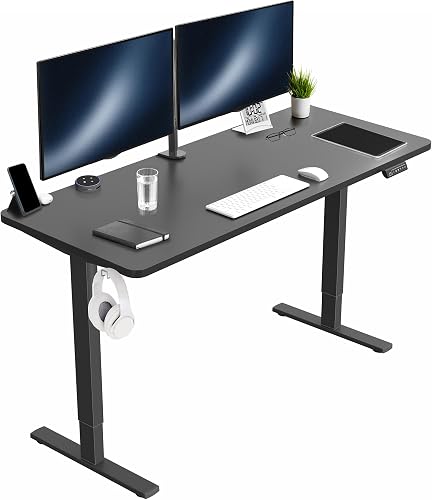
VIVO Electric 60 x 24 — Best for dual-monitor setups
If you wear progressives and run two monitors, the 60-inch surface is what makes this desk worth the money. Bifocal users with two screens have a specific problem: the reading zone is narrow, so the inner edges of side-by-side monitors can fall outside it, forcing constant head-turning. A 60-inch desk lets you angle the two monitors inward and pull them slightly closer, which keeps both screens inside the reading sweet spot. Memory presets store one height for your reading glasses and a slightly higher one for your single-vision computer glasses, if you switch between them. The 220 lb capacity is more than enough for two 32-inch monitors, an arm setup, and a laptop dock. The 24-inch depth is the minimum we'd accept for progressive comfort, and it just clears the bar.
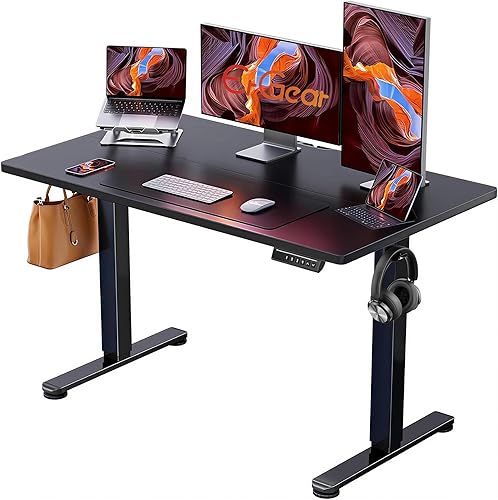
ErGear 48 x 24 — Best for single-monitor home offices
For a single-monitor setup, 48 inches is plenty. The ErGear is the budget pick we keep coming back to because its memory keypad has four presets — which is one more than most desks in this price range, and exactly enough for: sitting with progressives, standing with progressives, sitting with computer glasses, and one slot left over for a laptop-only height. The 24-inch depth matches the VIVO and is the minimum we recommend for progressive users. The 176 lb capacity handles a monitor arm and ultrawide without complaint, and the motor is quiet enough not to interrupt a call.
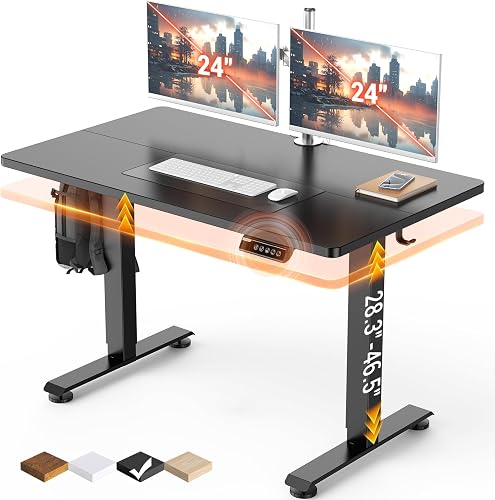
Veken 47.2" — Best when the desk has to look good in a living room
If your workspace doubles as living space and your partner vetoed industrial-looking desks, the Veken's wood top is the compromise. The frame is electric with height memory, so you don't lose the precision that matters for bifocal alignment. Capacity is the lowest of the three at roughly 154 lbs, so this is best paired with a single monitor on a low-profile stand rather than a heavy arm with a 4K display. The wood finish is the most living-room friendly option here, and the 47.2-inch width is small enough to tuck against a wall without dominating the room.
Dialing in the right height for progressives
Whichever desk you choose, the setup process is the same. Stand with your usual posture, looking straight ahead. Have someone mark the height of your eyes against a wall, then drop that mark by 2.5 inches. That's where the top of your monitor should sit. Tilt the screen up by 15 degrees. Save the height to memory. Repeat for sitting. The principles here apply whether you end up with a standing desk converter for bifocal wearers or a full electric desk — the geometry is the same, only the adjustment mechanism changes.
For more on monitor positioning, see our guide to monitor height for progressive lens wearers. If you're pairing the desk with a sit-stand setup, our anti-fatigue mat reviews cover the options that work best on carpet versus hardwood, and our monitor arm picks can give you the independent screen-height control that converters lack.
Frequently Asked Questions
What is the best monitor height for a standing desk when I wear progressive lenses?
The top of your monitor should sit 2 to 4 inches below your standing eye level, not at it. This positions your screen inside the reading zone of your progressives so you don't tilt your head back to focus. Tilt the screen 10 to 20 degrees upward to keep the whole display in that zone.
Can I use a regular standing desk converter with bifocals?
You can, but most fixed-position converters won't land at the height bifocal wearers need. Look for gas-spring or electric models with continuous adjustment, or step-based models with at least 10 positions across the 5 to 17 inch lift range. Z-lift converters with only 2 or 3 height positions almost never work for progressive lens users.
Are computer glasses better than progressives at a standing desk?
For long focused work, single-vision computer glasses cut neck strain because you can position the monitor at true eye level without tilting your head. Many progressive wearers keep a pair of computer glasses at their desk and switch to progressives only when they need to read paperwork or look across the room. A four-preset memory desk lets you save heights for both setups.
Should my monitor be higher or lower than usual if I wear bifocals?
Lower. The standard advice — top of screen at eye level — assumes single-vision lenses. With bifocals or progressives, that height forces you to tilt your head back to look through the reading zone. Drop the monitor 2 to 4 inches and tilt it upward instead. The reading-zone geometry is the same whether you're sitting or standing.
Do I need a monitor arm if I have a standing desk and wear progressives?
A monitor arm helps a lot because it lets you adjust monitor height and tilt independently of the desk. With a converter, the screen height is tied to the converter height. With a desk plus monitor arm, you can drop the screen the extra 2 to 4 inches progressives need without lowering the keyboard tier. For most bifocal wearers, a full electric desk plus a single monitor arm is the strongest combination.
How do I stop my neck from hurting at my standing desk if I wear progressives?
The pain is almost always from looking through the reading zone with your head tilted back. Three fixes, in order: lower the monitor 2 to 4 inches below eye level, tilt it 15 degrees upward, and switch to single-vision computer glasses for screen-heavy work. If pain persists after those changes, your prescription's intermediate zone may be set for a closer distance than your monitor — ask your optometrist about an occupational or computer-specific lens.
Is a sit-stand desk or a converter better for someone with progressive lenses?
A full electric sit-stand desk wins for most progressive wearers because it gives you millimeter-level height adjustment, separate memory presets for sitting and standing, and the option to add a monitor arm for independent screen positioning. A converter only makes sense if you can't replace the desk you already have — for example, in a rental or shared workspace where the desk isn't yours to swap.
Key Takeaways
- Choosing the right standing desk converter for bifocal wearers means matching the key features to your specific needs and budget
- Read real customer reviews and check the return policy before you commit
- Also covers: progressive lens desk setup neck strain
- Also covers: standing desk for glasses wearers bifocals
- Also covers: monitor height for progressive lenses converter
- Compare value across models — the priciest option is not always the best fit