If your Flexispot E7 is flashing E02, E03, or E08 and refusing to move, the fix is almost always a controller reset followed by a short cool-down. This flexispot e7 error code troubleshooting guide walks you through the universal reset (hold the down arrow until the desk dips and beeps), explains what each code actually means, and shows when the fault is a quick DIY fix versus a sign the motor or control box needs replacement. We cover wiring checks, duty-cycle limits, and what to do if your warranty has expired in 2026 — including three solid replacement desks if your E7 is finally done.
What the E02, E03, and E08 codes actually mean
Top Picks
Three solid replacement desks if the E7 is done
If your E7 is out of warranty and the control box or motors are failing, these are the standing desks our readers most often move to in 2026. Each one ships with a different trade-off — capacity, footprint, or finish — so pick by what your E7 was missing.
| Desk | Surface | Capacity | Best for |
|---|---|---|---|
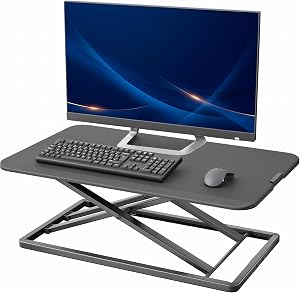
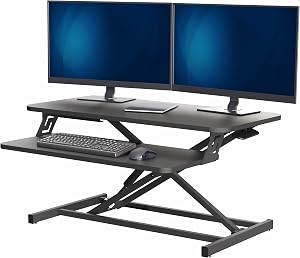
| VIVO Electric 60 x 24 | 60" x 24" black | 220 lb | Wide multi-monitor setup |
| Veken 47.2" | 47.2" wood top | 176 lb | Smaller rooms, warm finish |
| ErGear 48 x 24 | 48" x 24" | 176 lb | Budget upgrade with memory |
Flexispot's two-motor E7 frame uses a shared error vocabulary across most of its dual-motor lineup. The codes that send users hunting for help most often are:



- E02 — Motor overcurrent or load fault. The control box detected current draw above the safe threshold on one of the motor lines. Usually triggered by an obstruction, an overloaded desktop, or a binding column.
- E03 — Motor disconnection or hall-sensor error. The controller can't read a valid signal from one of the motors. Often a loose 8-pin DIN cable or a kinked motor cable inside the leg.
- E08 — Duty-cycle or thermal protection. You've exceeded the rated continuous run time (roughly 10% duty, or about two minutes of movement per eighteen minutes of rest). The frame is asking for a cool-down.
The universal Flexispot E7 reset (do this first)
Before chasing any specific code, perform a position reset. Nine out of ten E02 and E03 faults clear on a clean reset because the controller loses sync with the columns after a power blink, a pinch event, or a firmware hiccup.
- Clear the area under the desk completely. Pets, cables, drawer handles, and chair arms all count.
- Unplug the control box from the wall for 30 seconds, then plug it back in.
- Press and hold the down arrow on the keypad. The desk will descend to its lowest position and stop.
- Keep holding the down arrow. After about five seconds, the desk will dip slightly downward, beep once, and rise about a centimeter. That's your reset confirmation.
- Release the button. The display should now show a normal height reading instead of the error code.
If the code returns the moment you press up or down, move on to the code-specific checks below.
E02 — chasing the overcurrent fault
An E02 is the controller saying "something is fighting the motor." The fixes, in order of likelihood:
- Weigh your top. The E7 is rated for 355 lb (161 kg). Pile a thick rubberwood slab, an ultrawide monitor, a dual-arm mount, a CPU tower, and a cat tree on top and you can hit the limit faster than you'd think. Pull off everything heavy and try again.
- Look for binding. Lower the desk fully and watch each column. If one is scraping or canting, a cross-support bolt is probably loose. Re-torque the frame bolts in a star pattern.
- Check the motor cables. The flat ribbon cables that run up each leg can get pinched against the inner column tube during assembly. Loosen the leg, reseat the cable so it routes cleanly, and reassemble.
- Power-cycle the control box. Sometimes a transient overcurrent latches in firmware and only clears with a full unplug-replug cycle, not just a keypad reset.
E03 — restoring the motor signal
E03 is a communications fault. The control box pinged the motor and got silence or garbled data back. Work through these before assuming hardware failure:
- Reseat both motor plugs at the control box. The 8-pin DIN connectors should click in firmly. A connector that's 90% seated will read fine until vibration unseats it.
- Inspect the cable for crush damage. If you slid a heavy CPU stand or drawer into the cable run during installation, the conductors inside can shear even when the jacket looks fine.
- Swap motor cables left-to-right. If E03 follows the cable to the other side, the cable is bad. If it stays on the same side, the motor or column is the suspect.
- Try a single-motor test. Unplug Motor 2 and power-cycle. If the error becomes a different code (often E04), you've isolated the problem motor.
Flexispot will ship replacement cables and motors under the five-year frame warranty in most regions. Have your order number and a short phone video of the error ready before you contact support — it cuts the back-and-forth dramatically.
E08 — the cool-down you can't skip
E08 isn't a defect. It's the thermal protection telling you to stop. The E7 motors are rated for a 10% duty cycle: roughly two minutes of continuous travel followed by eighteen minutes of rest. If you've been demoing the desk to coworkers, repeatedly testing the memory presets, or running up-and-down because you can't decide on a height, you'll trip E08.
The fix is simple but boring:
- Stop pressing the keypad.
- Walk away for 20 minutes.
- The code clears on its own once the motors drop below the thermal threshold.
If E08 returns after a brief use, you almost certainly have a binding column dragging the motors and forcing them to work continuously even for short moves. Treat it as an E02 root-cause problem and check frame alignment.
When the reset doesn't stick: deeper flexispot e7 error code troubleshooting
Codes that survive a clean reset, fresh cabling, and an empty desktop usually mean one of three things:
- The control box is failing. These do go bad, especially after a brownout or a surge. Replacements run roughly $90 and are user-installable in about 15 minutes.
- A motor is shot. Usually preceded by grinding, clicking, or one column lagging the other on the way up.
- Internal column wear. Less common, but heavy daily use over five-plus years can wear the glide pads inside a column, causing constant binding.
If you're past warranty and looking at a $150+ parts bill on a desk that's already showing age, it can be cheaper and less frustrating to replace the whole frame. For more context on whether to repair or swap, see our repair-vs-replace breakdown.
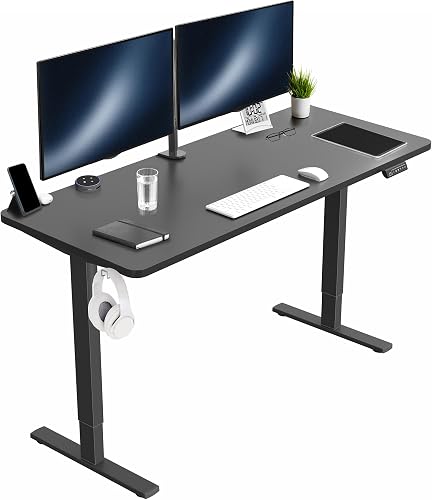
VIVO Electric 60 x 24 in Standing Desk
If your E7 was a 60-inch frame and you want a like-for-like surface area without the dual-motor complexity that caused your E02 and E03 troubles, the VIVO is the closest match. The 220 lb capacity easily handles a triple-monitor arm and a midsize CPU, the memory presets work the same way the E7's did, and the black laminate top is a forgiving choice if you've grown tired of fingerprints on a glossy finish. VIVO Electric 60 x 24 in Standing Desk.
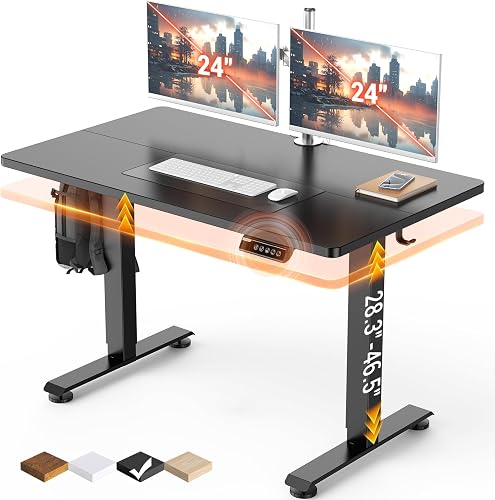
Veken 47.2" Standing Desk with Wood Desktop
For a home office or a smaller second workstation, the Veken trades width for a genuinely attractive wood-grain top that doesn't scream "office furniture." The 47-inch surface is enough for a single ultrawide plus a laptop, and the height range fits users from about 5'2" to 6'4". This is the pick if your E7 lived in a guest-room corner and you want something that disappears into the room. Veken 47.2" Standing Desk.
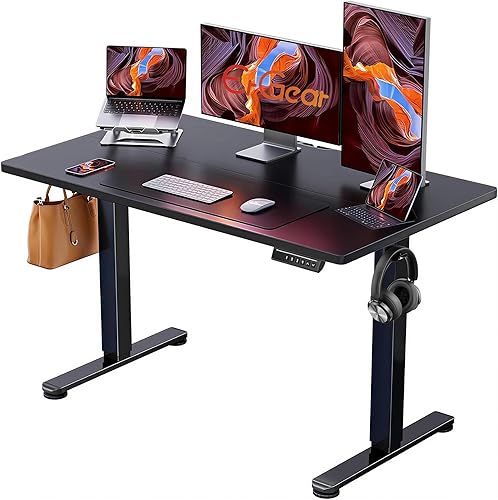
ErGear Height Adjustable 48 x 24 Standing Desk
The ErGear is the budget hedge. If your E7 lasted five years and you'd be happy with another five, the ErGear delivers a stable single-motor frame, memory presets, and a 48 x 24 worktop at well under half the cost of a new E7. Capacity is lower (176 lb) and travel speed is slower, but the error-code surface area is also smaller — fewer sensors and motors means fewer things to throw a fault. ErGear Height Adjustable Electric Standing Desk.
Still on the fence? Our budget standing desk roundup for 2026 compares these three head-to-head with five other contenders.
Preventing the next error code
Once you've cleared the fault, a few habits keep the codes from coming back:
- Respect the duty cycle. Don't run the desk up and down ten times in a row to show a friend. Two cycles, then leave it alone for 20 minutes.
- Re-torque the frame every six months. Bolts work loose with daily motion. A 10-minute pass with an Allen key prevents the binding that causes E02.
- Route cables carefully. Keep monitor and CPU cables out of the column travel path. Pinched cables are the leading cause of E03 calls to support.
- Plug into a surge protector, not the wall. Control boxes don't love voltage dips and spikes. A $20 surge strip pays for itself.
For deeper care tips, our standing desk maintenance checklist covers the quarterly tasks that double the lifespan of any electric frame.
Frequently Asked Questions
How do I reset my Flexispot E7 if the display only shows the error code and nothing else?
Unplug the control box from the wall outlet for a full 30 seconds. Plug it back in, then press and hold the down arrow on the keypad. Keep holding even after the desk stops at the bottom. After about five seconds, the desk will dip slightly, beep, and rise about a centimeter — that's the reset complete. The display should now read a normal height in centimeters or inches.
Why does my Flexispot E7 show E08 every time I try to move it?
E08 is a thermal-protection code triggered when the motors exceed their 10% duty cycle. If it's returning after a single short move, one of your columns is binding and forcing the motors to work harder than normal even on brief travel. Lower the desk fully, check that all cross-support bolts are tight, and inspect each leg for visible misalignment. A repeated E08 with normal use almost always traces back to a frame-alignment problem, not a faulty motor.
Can I fix Flexispot E7 error code E03 without buying a new motor?
Usually yes. E03 is a signal-loss error, and the cable is the culprit far more often than the motor. Reseat both 8-pin DIN connectors at the control box, then swap the left and right motor cables. If the error follows the cable to the opposite side, you need a replacement cable (Flexispot will ship one under warranty). If the error stays on the same side, the motor or column itself is the failed component.
Is the Flexispot E7 error code E02 covered under warranty?
The five-year frame warranty covers the motors, columns, and control box, so a genuine E02 caused by a failed motor is covered. However, E02 caused by overloading the desk past its 355 lb rating or by user-induced binding (assembly errors, missing cross-support bolts) is considered misuse. Have your order number and a short video of the fault ready when you contact Flexispot support — it speeds up the warranty determination significantly.
What's the difference between the Flexispot E7 reset and a factory reset?
The down-arrow reset described in this flexispot e7 error code troubleshooting guide only re-syncs the columns to their zero position. A full factory reset clears the memory presets and the height-limit settings too. To perform a factory reset on most E7 keypads, press and hold the M button together with the down arrow for about 10 seconds until the display shows "RST" or similar. You'll need to re-program your sit and stand presets afterward.
How long should a Flexispot E7 last before motor or controller failure?
Used within spec — under 355 lb load, respecting the duty cycle, with periodic bolt re-torquing — the E7 reliably hits seven to ten years before a motor or control-box failure. Heavy-load users (gaming setups with multiple monitors and a CPU tower) often see the first error codes at the five-year mark. The control box is the most common first-failure component, followed by one of the two motors.
Will a Flexispot E7 still work if I bypass the error code?
There's no safe way to bypass the codes. They're triggered by the control box's safety logic, and the firmware physically blocks motor activation while a fault is latched. Attempting to power the motors directly bypasses both the soft-stop and the overcurrent protection, which can damage the columns, snap a lead screw, or — worst case — drop a loaded desktop on whatever is underneath. Always resolve the underlying fault rather than trying to defeat the controller.
Key Takeaways
- Choosing the right flexispot e7 error code troubleshooting means matching the key features to your specific needs and budget
- Read real customer reviews and check the return policy before you commit
- Also covers: flexispot e7 e02 error reset
- Also covers: flexispot standing desk error e03 fix
- Also covers: flexispot e08 error troubleshooting
- Compare value across models — the priciest option is not always the best fit